

Virtual Try-On
COMING SOON ... May 2026
Choosing the right frames to suit your style is an important part of being confident in your choice of glasses.
With a few simple steps, you can try on our most popular styles - virtually - before making a purchase.
Download the OCHO Vision App
-
iOS (iPhone 13 or above required)
-
Download here: App Store Download
-
Using an iPhone 13 or above allows users to take their optical measurements within the OCHO Vision app.
-
Compatibility
-
iPhone: Requires iOS 13.0 or later.
-
iPad: Requires iPadOS 13.0 or later.
-
Mac: Requires macOS 11.0 or later and a Mac with Apple M1 chip or later.
-
-
On iPhone, glasses shown on a user's face within the app will be close to their actual size.
-
Please be sure to also reference frame dimensions to confirm the glasses are a good fit for you.
-
-
Android
-
Download here: Play Store Download
-
Measurements are not currently available to Android users.
-
Glasses shown within the app for Android phones are for style reference only, the size of the frames are not accurately portrayed.
-
Please reference frame dimensions on each product page.
-
Follow these easy steps:
-
Download the OCHO App.
-
Locate the OCHO App on your device.
-
Type in Store Code
-
Type: "DocNanda" (not case sensitive)
when prompted for the store code.
-
-
Select Your Frames:
-
Once a frame is clicked, you can click on the frame color to access additional colors, if available.
-
-
Measurement:
-
Click on the 'Measurement' button to collect your measurements so that you may enter any required values into your prescription lens order.
-
Pupillary Distance PD (pupillary distance) is required for all prescription lens orders
-
-
Segment Height:
-
Segment Height is only required if ordering progressive lenses.
-
To provide your segment height:
-
Provide the lower of your OC (OD-right eye) or OC (OS-left eye) that is displayed
on the OCHO Vision measurements page. -
Note: Segment height measurements are dependent on frame choice.
-
-
Please be sure to take these measurements on the frame you intend to purchase - REMEMBER- the numbers will be different with each unique frame.
-
 Step 1: Choose OCHO app | 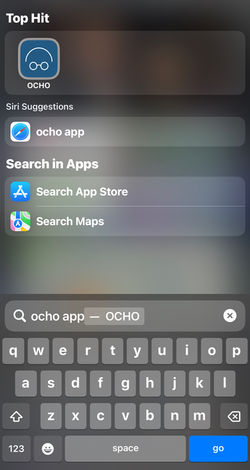 Step 2: Locate OCHO app |
|---|---|
 Step 3: Enter: DocNanda |
 How to Measure |
|---|